Budgeting
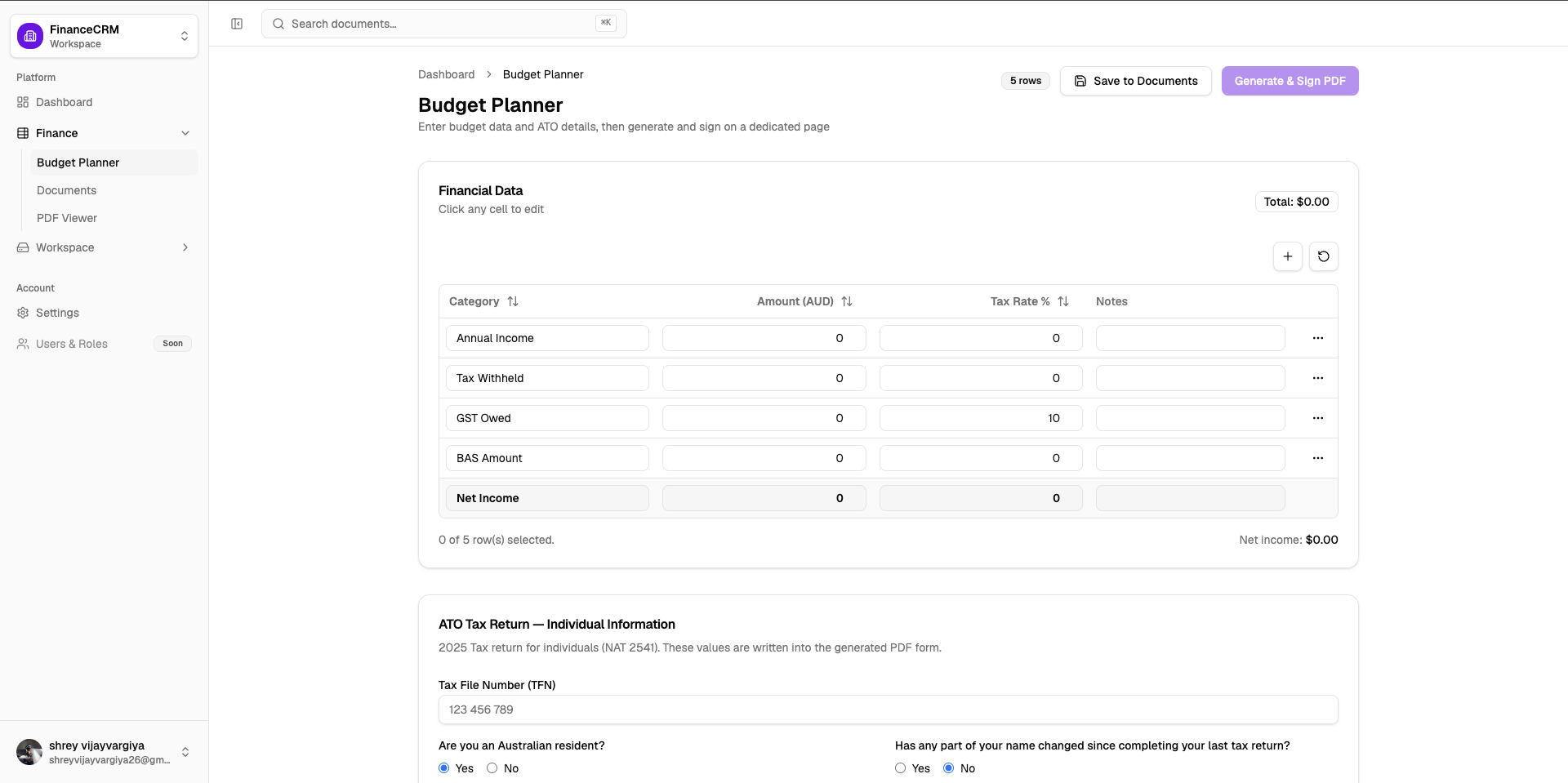
Spreadsheet style grid for income, expenses, and net position, built for small business accounting workflows.

Plan, manage, summarize, analyze your financials. Built by Australian finance and accounting professionals.
Free to start. No credit card required.
Free
To get started
Tax
PDF templates
PIN
Protected shares
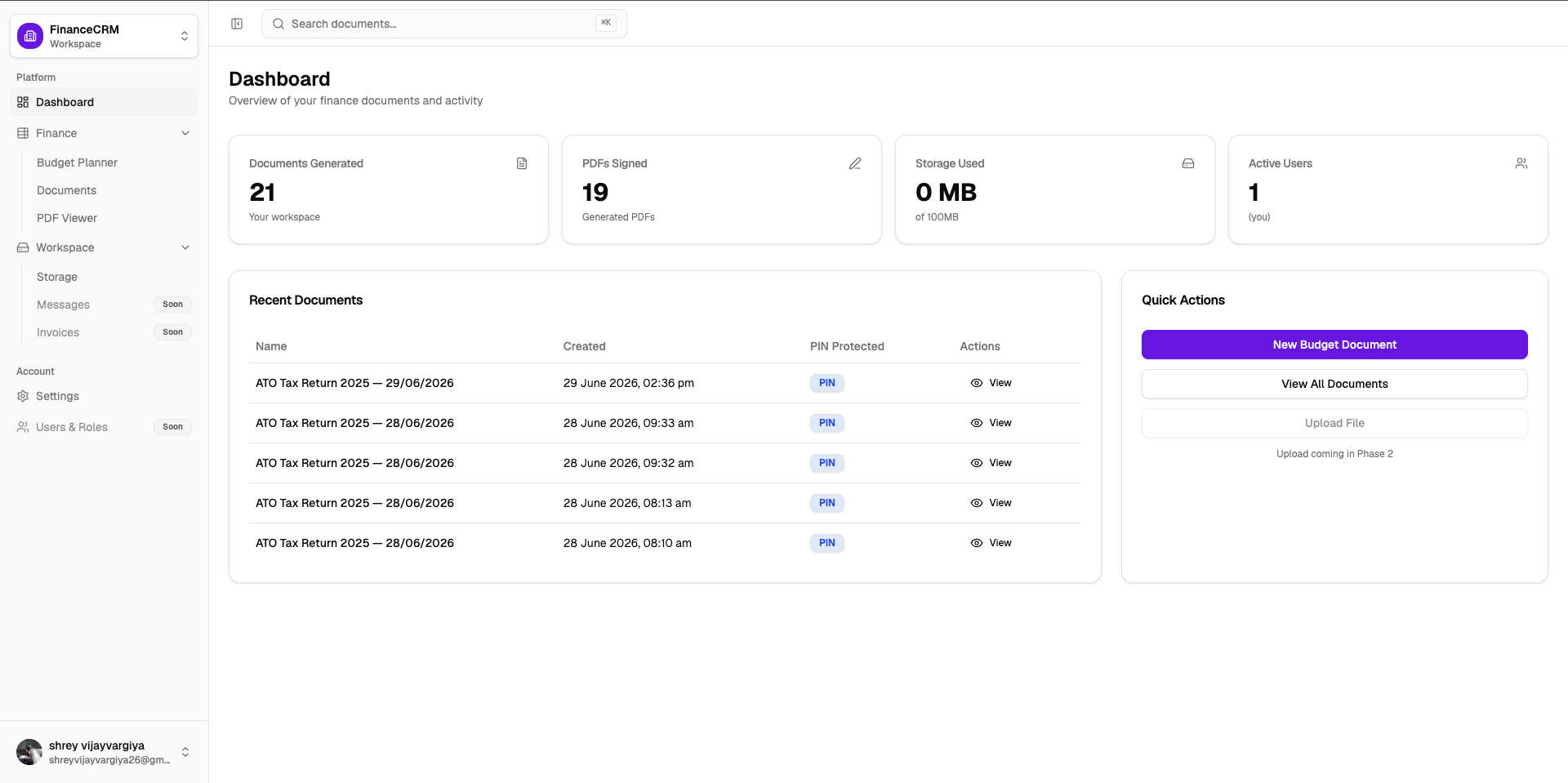
Accounts, Finances, Payroll, Taxation, Recordkeeping and auto generated statements
Spreadsheet style grid for income, expenses, and net position, built for small business accounting workflows.
Generate structured tax PDFs from budget data and taxpayer details, ready for review and filing prep.
Embedded DocuSeal signing so clients complete documents without leaving your workspace.
Bank statements, invoices, and a private document library with optional Drive backup and PIN protected sharing.
Budgets, bank files, and audit ready PDFslive in one workspace
Most practices still assemble an audit pack from a spreadsheet, a PDF tool, a signing tab, and a drive. The numbers you plan are not the numbers you file.
Income and expenses sit in a workbook that never reaches the tax PDF.
Bank files, invoices, and payees arrive by email instead of the client workspace.
Signed PDFs, taxpayer details, and share links are rebuilt for every review.
Three jobs your practice already does. One client workspace so the numbers stay aligned from first draft to signed PDF.
Budgeting
Income, expenses, and net position stay in one grid.
Plan client budgets in a spreadsheet style workspace that feeds tax PDFs instead of living in a separate workbook.
Financing
Bank files, invoices, and payees sit beside the budget.
Extract bank statements, track invoices, and review cash flow on the dashboard so financing advice starts from the same numbers.
Auditing
Tax PDFs, signatures, and PIN protected links in one pack.
Generate structured tax PDFs, collect electronic signatures, and share PIN protected files so audit prep does not mean hunting through email.
Accounts, Tax, Finances, Payroll and more
Sign up with email or Google. Your workspace is ready in seconds.
Use the budget grid and taxpayer form to capture figures and client details.
Create a tax PDF, sign in the embedded DocuSeal flow, and finalize the document.
Documents save to your library. Optionally back up to Google Drive or share with a PIN.
Trusted by practices
Plan budgets, track financing, prepare tax PDFs, and keep client documents in one secure workspace.
“We replaced three separate tools with one calm workspace. Budget planning and PDF signing now happen in the same session our clients expect.”
Sarah Chen
Principal accountant · Chen & Partners
Melbourne, VIC
“The budget grid matches how we already work on spreadsheets, with proper document storage and electronic signing built in.”
James Okonkwo
Tax adviser · Northside Advisory
Brisbane, QLD
“Bank statement extraction saves us hours each month. Cash flow summaries land straight on the dashboard for client reviews.”
Priya Sharma
Bookkeeper · Sharma Business Services
Sydney, NSW
Questions
Straight answers on auditing, financing, budgeting, storage, and the free plan.
Yes. The budget planner and tax PDF workflow are designed for Australian small business and tax preparation.
Yes. Structured taxpayer data, budget summaries, signed PDFs, and PIN protected links give reviewers a clean document trail in one workspace.
Upload bank statements for extraction, track invoices and payees, then review cash position on the dashboard next to the client budget.
No. The free plan includes the budget planner, tax PDF generation, document library, and electronic signing. Upgrade when you need Drive backup and more storage.
Pro and Team plans are available via Polar checkout. Sign in and choose a plan from Pricing, Settings, or the upgrade button in your dashboard.
Documents stay in your private Supabase workspace. Signed PDFs can optionally sync to your own Google Drive.
No. Drive backup is optional. Connect it once in Settings to upload signed PDFs automatically.
Yes. You send a DocuSeal signing flow from the workspace. Completed PDFs save back to the document library.
Yes. Paid plans can be cancelled anytime. You keep access through the billing period, then continue on the free plan.
Plan budgets, prepare tax ready PDFs, collect signatures, and store client documents. Free to start. No credit card required.
Keep audit packs ready before the deadline
Generate tax ready PDFs in minutes
See financing next to the client budget
Keep every client document in one workspace
Free plan available. Cancel paid plans anytime.